CapTable
Get a complete overview and insight with Captable+.
Our share depository solution CapTable+
We believe in showing respect to our shareholders.
With our custody service CapTable+, the shareholders do not have to keep track of the various transactions carried out in the share register. The shareholder can log in himself and follow the changes that affect his ownership in the company. The company can also make it easier for the shareholder to stay informed about the company's development by using the communication tools in Invono One.
"It should be easy to own shares in unlisted companies".
In Captable+, the shareholder follows information in real time about portfolio companies they have invested in both as a private individual but also indirectly if they have invested via companies or endowment insurance.
Some of our smart functions are that you subscribe for shares digitally in new issues, you can participate via video link and vote digitally at general meetings, and you update your contact details for all companies you are an owner in, with a single push of a button.

When your shareholders sign up to our platform, they automatically get insight into the details of the investment they have made in your company.

When managing your files and documents in our platform, you can easily specify which folders and even which individual files within should be accessible to your shareholders.

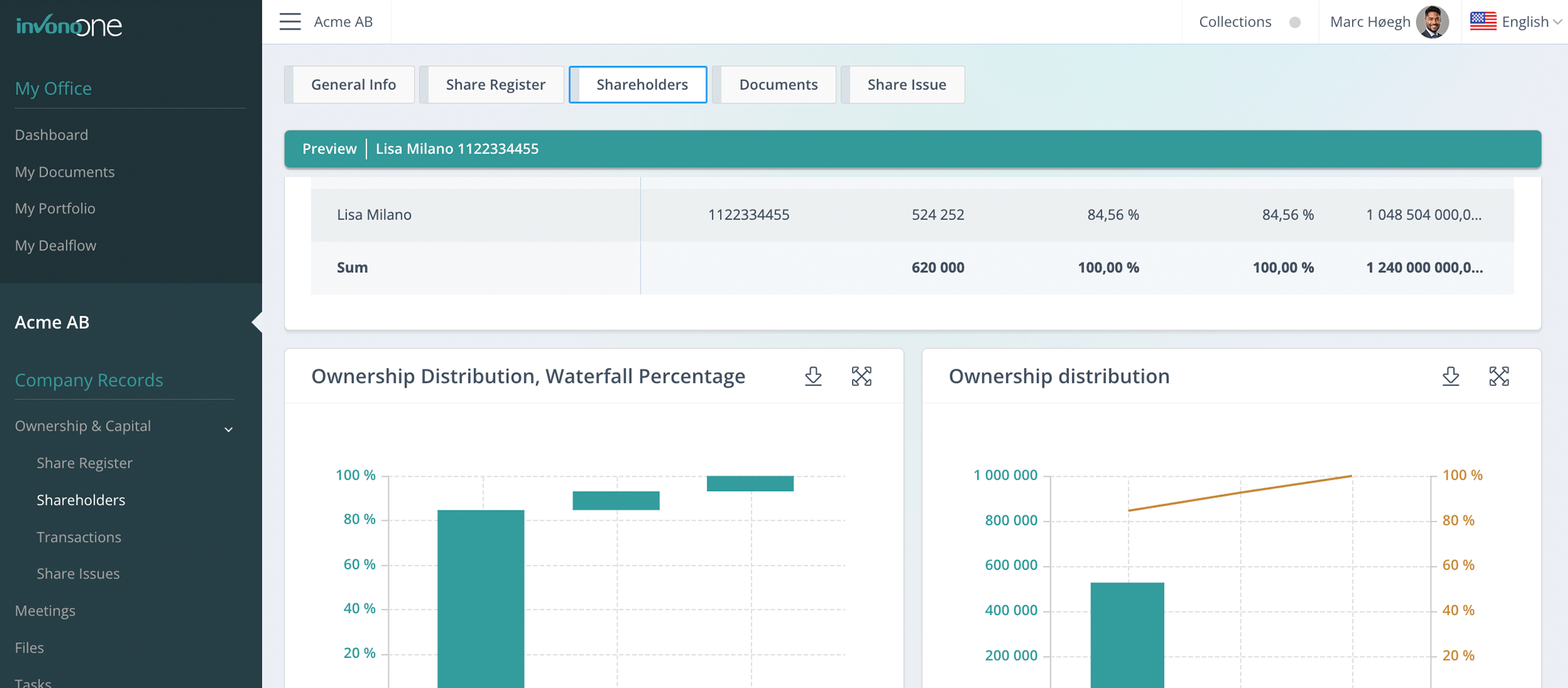
View all relevant data related to the ownership of your company. This includes information about the history of transactions and share issues over time, the effects they've had in terms of dilution and valuation and much more.
This information is presented through tables and graphs and can be exported for use in presentations etc.

Experience the benefits of the otherwise time-consuming, complex and expensive job of issuing shares in your unlisted company by following a structured workflow streamlined towards addressing the legal and practical concerns associated with this process.
Questions about our share depository service CapTable+
Does the custody service CapTable+ cost anything?
Yes, we charge the companies that post their share register in Invono One if they want to provide this service to their shareholders. It is a small price to pay to show your shareholders the respect it means to make it easier for them to own shares in their company. The companies get a lot of other functions when they choose one of the subscription forms in Invono One. If you as a shareholder lack this service, we recommend that you make the portfolio company aware of the benefits.
Can shareholders enter their own information?
Yes, you can both add your own portfolio companies but also add both your own transactions and adjust values in transactions that come from the portfolio company's transaction data. It could be the case that you have not disclosed the price of a transfer carried out in the company's share register and subsequently want to enter the correct transfer price yourself. Transaction data that comes "untouched" from the company's share register is marked with a green connection symbol. This symbol "breaks" and changes color if you enter the transaction yourself or change an existing transaction. You change or add transaction data under the [Own Records] tab.
If you invested via a (investment) company, you must register as a shareholder in the investment company to see the Portfolio Company under [My Portfolio] and access the [Own Records] tab. The [Own Records] tab is not visible when looking at the custody service CapTable+ under [Corporate Investments]. The reason for that is that here several people from the investment company can follow the investment in the various portfolio companies and the [Own Records] tab is personal.
Why do you need share accounts for shares in private companies?
Share accounts in private companies make it easy, secure, and structured for shareholders to track their ownership, and for companies to manage investor relations efficiently. In Invono One, each shareholder receives a personal account – CapTable+ – with real-time access to ownership details, documents, transactions, and ongoing or past share issues.
Private companies often have many shareholders and complex ownership structures. With digital share accounts in Invono One, both investors and companies benefit from a professional system that enhances trust, improves communication, and ensures access to correct and up-to-date information.
Why Share Accounts Are Needed in Private Companies – Transparency, Structure, and Control
Traditionally, share accounts (depåer) were associated with public markets. But as unlisted companies grow and attract more investors, the need for digital share accounts in private companies has become critical. Invono One offers a solution that not only visualizes ownership but adds structure, control, and process efficiency.
1. What Is CapTable+ – More Than Just a Shareholder List
Invono One’s share accounts are called CapTable+ because they:
Include far more than a basic shareholder list (cap table)
Provide real-time ownership views for each individual shareholder
Contain six dedicated tabs with data, history, documents, and transactions
Integrate both direct and indirect ownership
Whether investing privately or through an investment company, CapTable+ gives users full portfolio visibility.
2. Easy Access via [My Portfolio] and [Company Investments]
[My Portfolio]: Displays all companies you’ve invested in, directly or indirectly (if you’re registered as a shareholder in your investment company)
[Company Investments]: Designed for board members, CFOs, analysts, or advisors who need access but don’t own shares themselves
This ensures that each user sees only what they need – based on their role and relationship to portfolio companies.
3. Tabs in CapTable+ – Full Shareholder Insight
General Info
Displays company details, board composition, financial reports, and corporate filings (via Syna integration).
Share Register
Lists all transactions that affect your holdings, including issues, transfers, ownership changes, valuation history, and capital raised. Shareholders can export a report showing their own entries in the register.
Shareholder List
Shows the full ownership structure with charts and the ability to generate comprehensive reports.
Private Entries
Lets shareholders add missing transactions, useful if the company hasn't fully adopted Invono One yet. Any manually added data that differs from the official share register is flagged for transparency.
Documents
Stores all shared documents such as meeting minutes, annual reports, CEO letters, and share issue offers – easily accessible by shareholders at any time.
Share Issues
Shows current and past share issues the shareholder has been invited to. Includes application forms, allotment notices, and receipts – all in one place.
4. Benefits for Shareholders
Clarity and control: Real-time ownership insight
Always up to date: Instantly reflects share transactions and changes
Easy document access: All essential company information organized in one place
Fewer questions: No need to request basic info from the company
5. Benefits for the Company
Reduced admin workload: The system is intuitive – support needs are minimal
Streamlined shareholder communication: Use the document tab to share all important files
Increased trust: Professional ownership handling builds long-term credibility
Share issue integration: Easily manage new issues with built-in digital processes
6. Especially Valuable for Indirect Ownership and Larger Cap Tables
For ownership via investment companies, angel networks, or funds:
Connect investors to their investment companies for full portfolio transparency
Role-based access allows CFOs and auditors to monitor holdings
Private entries give investors flexibility when data is still being updated by the company
7. Smarter, Simpler Shareholding with Invono One
In short, Invono One’s CapTable+ offers:
Transparency
Time savings
Legal compliance
A professional investor experience
It’s the modern solution for managing ownership in unlisted companies – available today.
How do you track corporate investments?
When you invest through a company – an investment vehicle – that company is the legal shareholder listed in the portfolio company's share register. In Invono One, you can track such investments in two ways: through [My Portfolio] if you're a registered shareholder in the investment company, or through [Company Investments] if you hold another role with appropriate permissions, such as CFO, advisor, or auditor.
Tracking investments through structured, role-based access ensures oversight, efficient communication, and transparency. Invono One allows investment companies and their members to monitor their portfolio holdings professionally while keeping key contacts informed and involved. This protects capital and supports long-term, engaged ownership.
Tracking Corporate Investments – Structure, Insight, and Control
When you invest via a company (an investment company), that legal entity is listed in the share register of each portfolio company – not you personally. Invono One provides two clear and secure ways to track these investments, based on your role and level of involvement.
1. Through [My Portfolio] – If You Are a Shareholder in the Investment Company
If you personally own shares in the investment company:
Register yourself as a shareholder in the investment company within Invono One
The system will automatically link you to the portfolio companies that your investment company has invested in
Your direct investments are displayed at the top of [My Portfolio]
Indirect investments (via the investment company) are shown further down
No extra setup is needed from the portfolio companies – the system manages the connection automatically.
2. Through [Company Investments] – For Team Members or Advisors
If you are not a shareholder but need access to investment data:
Select your investment company from the top left menu
Navigate to [Company Investments]
View a summary of all portfolio companies the investment company has invested in
Click [Open CapTable+] to access detailed investment information
This method is ideal for:
Board members
CFOs / financial controllers
Auditors
Investment advisors
Investment administrators
Access is role-based and portfolio companies can assign multiple contact persons for different responsibilities.
3. Accurate Contact Management and Communication
In your [My Profile], you can:
Enter and update your contact details – synced across all relevant companies
Use different email addresses for different portfolio companies if needed
Ensure you never miss important notices about general meetings, share offers, etc.
Invono One ensures that companies always reach the right person – without manual coordination.
4. Professional Investment View via CapTable+
Clicking [Open CapTable+] for a portfolio company provides access to:
General company information
Share register and ownership structure
Historical transactions and valuations
Documents shared by the portfolio company
Personal notes and manual entries if applicable
This delivers a complete picture of your investment – whether you are the investor, advisor, or administrator.
5. Respecting Investor Capital – Simplifying Portfolio Management
Invono One is built to help investment companies and their teams:
Keep track of portfolio holdings in one place
Receive timely, accurate information
Avoid communication breakdowns and unclear responsibilities
Enable long-term, transparent engagement and collaboration
With Invono One, tracking corporate investments becomes simpler, clearer, and more effective – helping you protect capital and support value creation.
Add your shareholders, carry out all types of transactions and create your digital share register today.